Habit Tracker: A Free Way to Build Habits That Stick
You decide to walk every day, floss more or read before bed. The first week goes well. Then you skip a day, then two, and by the end of the month you can't remember the last time you did it.
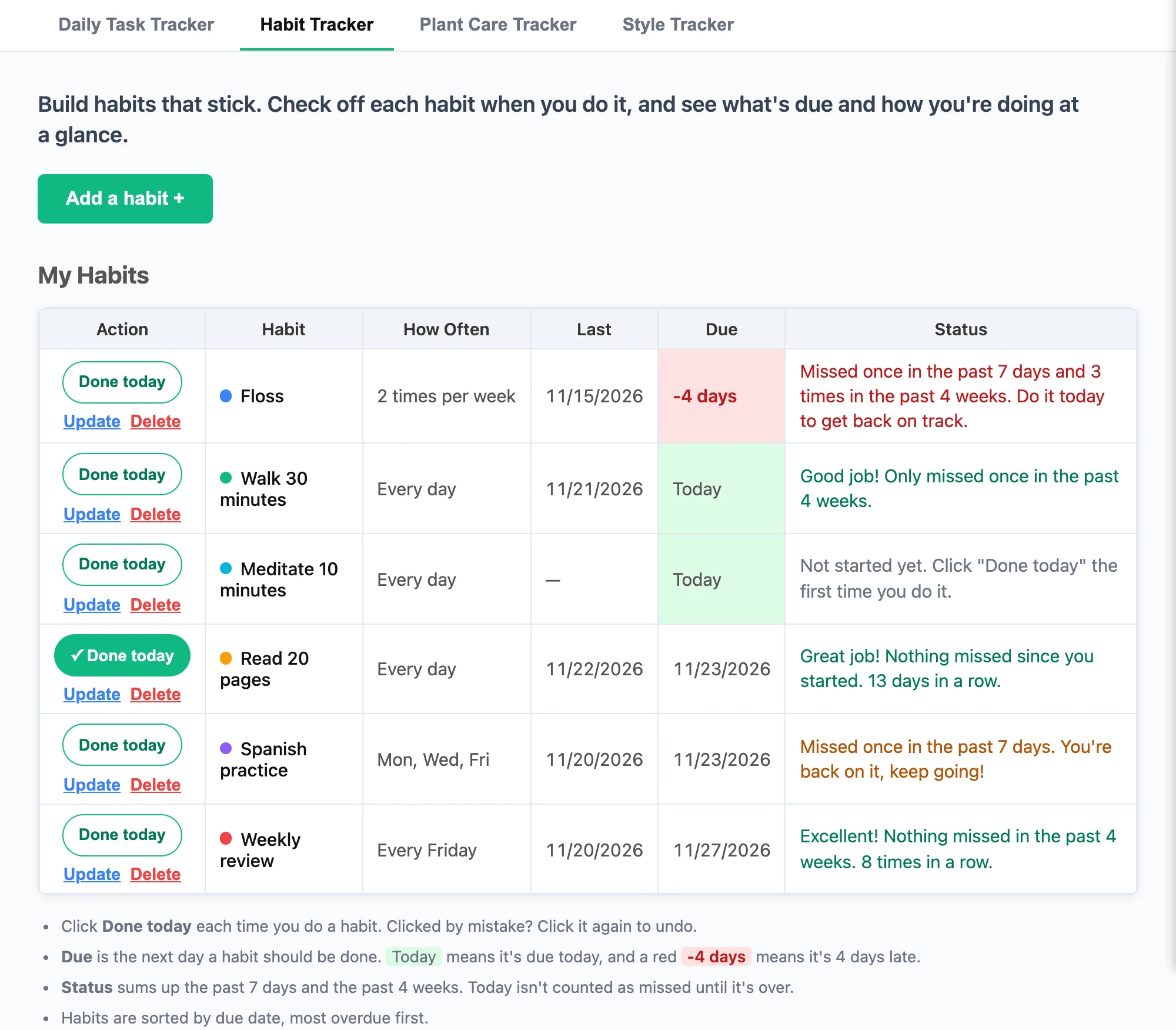
The Habit Tracker is a tab in IAM Rate, right after the Daily Task Tracker. The same app also has a Plant Care Tracker and a Style Tracker. You add each habit once and say how often you want to do it. Each time you do it, you click Done today. The tracker shows you what's due, what's late and how you're doing.
Why tracking a habit helps
Memory is a poor judge of habits. A week where you walked four days can feel like a week where you walked every day, or like a week where you never got out at all. Without a record, you don't know which one it was.
A tracker gives you the real answer. You see the last day you did each habit and how many days you missed. A slip shows up after one day, not after a month, while it's still easy to get back on track.
It also feels good to keep a streak going. When the tracker says "13 days in a row," you have a reason to make it 14.
Add a habit in a minute
Open the app and click the Habit Tracker tab. The first time, you'll see a sample habit called "10 push-ups (sample)", so the table and the calendar aren't empty. Update it or delete it when you add your own.
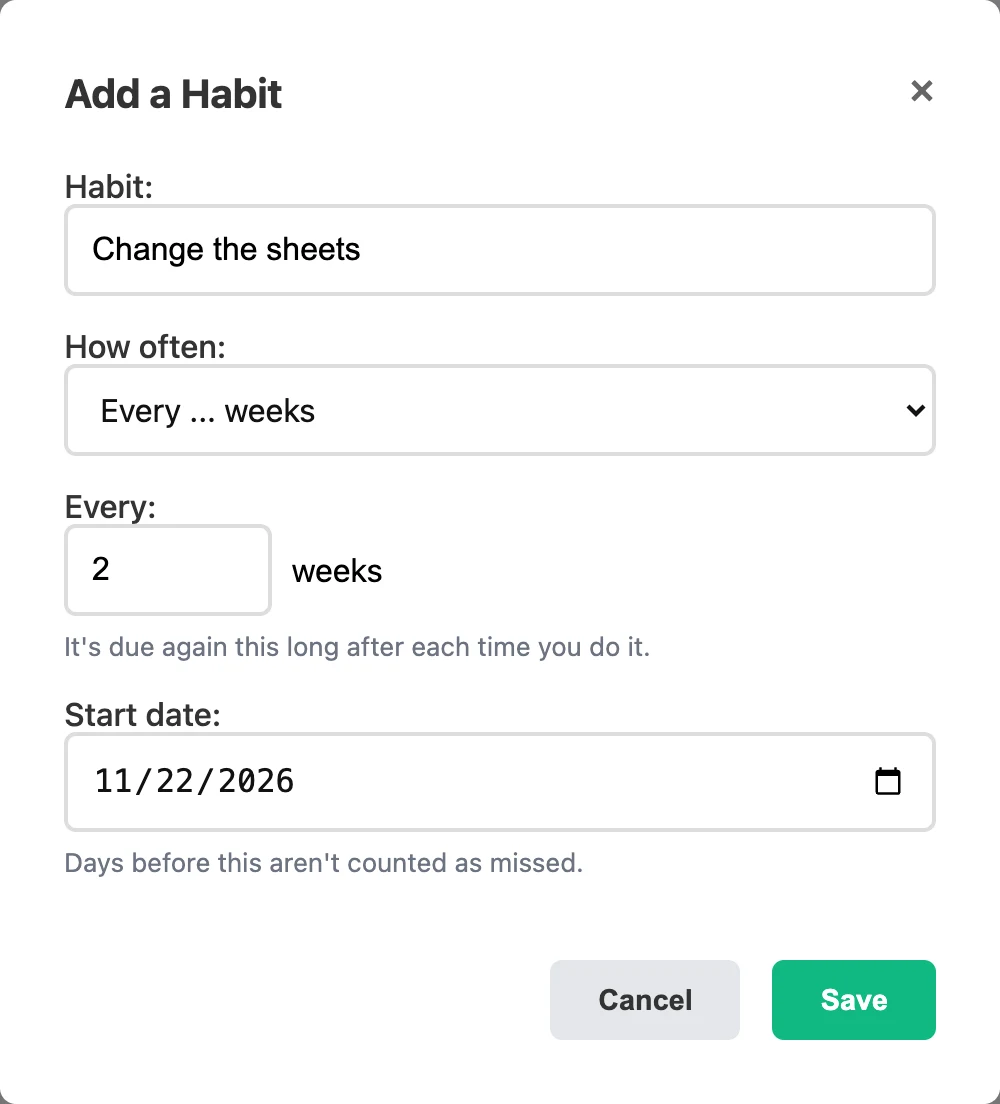
- Click Add a habit +.
- Type the habit, like "Walk 30 minutes" or "Read 20 pages".
- Choose how often: every day, every week, every month, every so many days, weeks or months, on certain days of the week, or a number of times per week.
- If you chose certain days, tap the days. If you chose times per week, pick how many. If you chose every so many days, weeks or months, type the number, like 3 days or 6 months.
- Check the start date. It's set to today. Days before it never count as missed.
- Click Save.
Tip: Make each habit small and clear. "10 push-ups" is easy to check off. "Get fit" never is, because you never know if you've done it.
Ways to schedule a habit
| How often | Good for | Due again |
|---|---|---|
| Every day | A walk, reading, meditating | The next day |
| Every week | Cleaning the house, calling a family member | 7 days after the last time |
| Every month | Paying a bill, checking your budget | The same date next month |
| Every ... days, weeks or months | Changing your sheets every 2 weeks, a haircut every 6 weeks, a dentist visit every 6 months | That many days, weeks or months after the last time |
| On certain days of the week | The gym on Monday, Wednesday and Friday, or a weekly review every Friday | The next day you picked |
| A number of times per week | Flossing, cooking at home, a run when the weather is good | A few days later, spread over the week |
Pick certain days when the day matters, like a class you have on Tuesdays. Pick a number of times per week when it doesn't. The tracker spreads those habits over the week, so twice a week is due again 3 days after the last time, and three times a week every 2 days.
Pick Every week, Every month or Every ... days, weeks or months when it only matters that the habit gets done, not which day. The next due date counts from the last time you did it. A monthly habit last done on the 31st is due on the last day of a shorter month, like November 30.
See what's due at a glance
The Last column shows the last day you did each habit. Due shows the next day you should do it. Say you walk every day and last walked on 11/21. Due shows Today on 11/22.
Color tells you the rest:
- Green Today means the habit is due today.
- Red, like -4 days, means the habit is late, and by how many days.
- A plain date means you're done for now. That's the next day it's due.
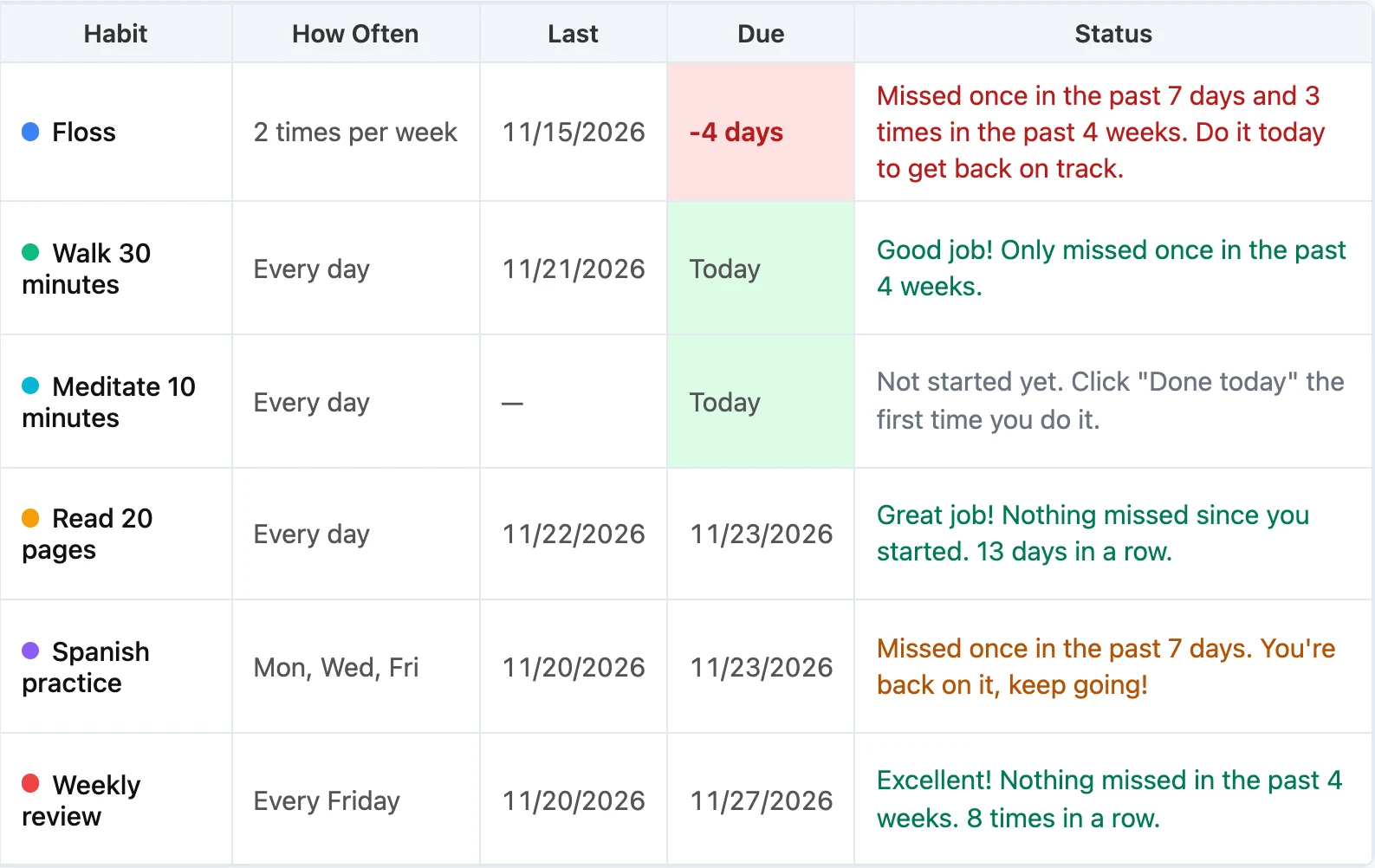
Habits are sorted by due date, with the most overdue first. The habits that need you are always at the top of the table.
Click Done today when you do it
Each habit has a Done today button. Click it when you do the habit. It turns green with a check mark, the Last date becomes today, and the Due date moves forward by itself. Clicked by mistake? Click it again to undo.
One thing to know: the tracker doesn't send notifications. You open the tab and look for red and green. It helps to tie this to something you already do each day, like making your morning coffee or brushing your teeth at night.
Status: how you're doing in plain words
Numbers alone don't tell you much, so the Status column sums up each habit in a sentence. It looks at the past 7 days and the past 4 weeks. Here are a few you might see:
| Status | What it means |
|---|---|
| Good start! Done 3 times so far. | A new habit, with nothing missed yet |
| Excellent! Nothing missed in the past 4 weeks. 8 times in a row. | On track for a month, with a streak |
| Good job! Only missed once in the past 4 weeks. | One slip, and you're past it |
| Missed once in the past 7 days. You're back on it, keep going! | A recent slip, but you've done it since |
| Missed once in the past 7 days and 3 times in the past 4 weeks. Do it today to get back on track. | Late now, and it has slipped before |
| Not started yet. | You haven't checked it off the first time |
The text is green when you're on track, orange after a recent slip and red when the habit is late. Today never counts as missed until it's over, so you have all day. For a habit you do a few times a week, a miss means a week where you did it fewer times than you planned. For a habit you do every month or less often, watch the Due column: it turns red when you're late.
The calendar: fill in a day you forgot
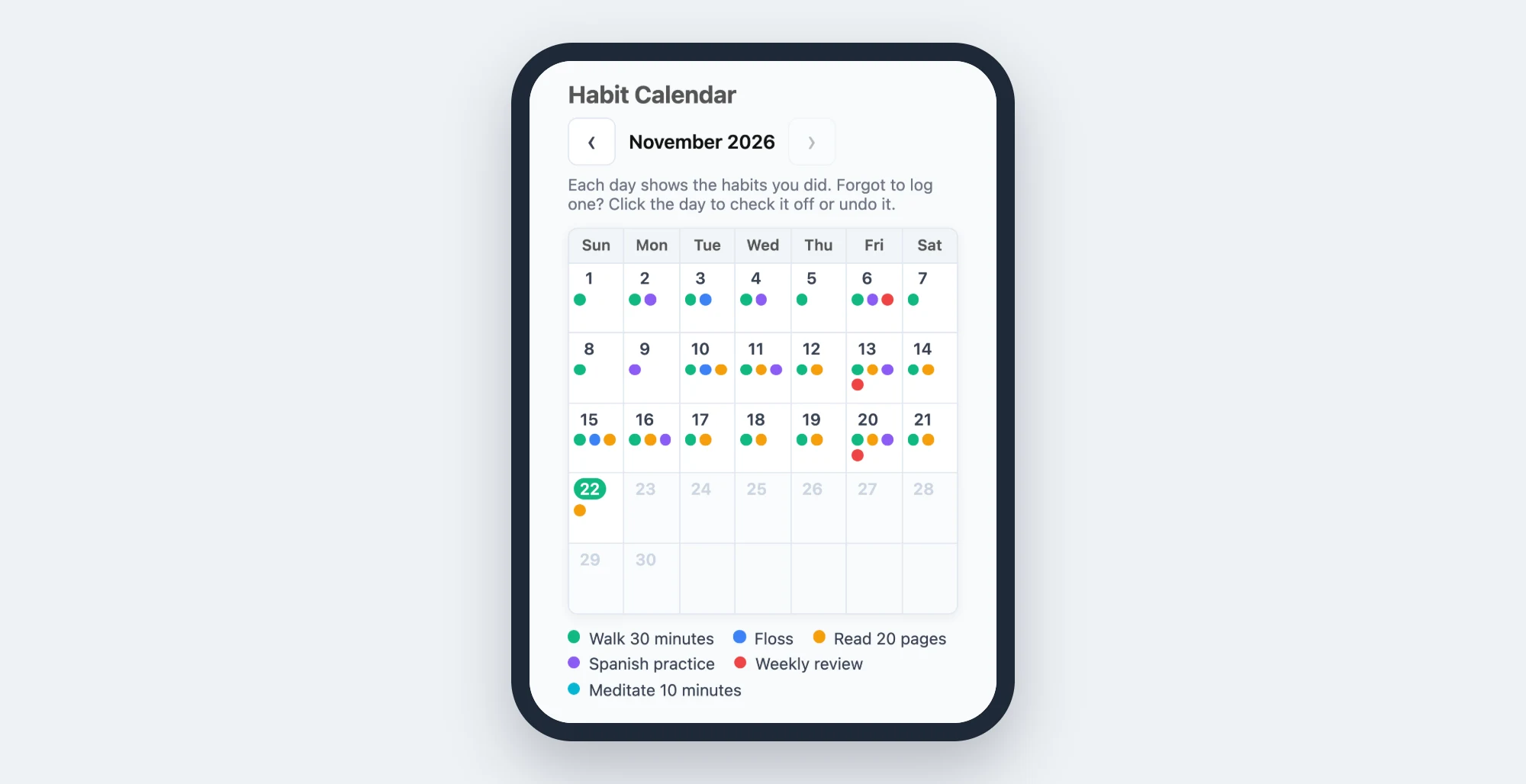
Below the table, the Habit Calendar shows one month at a time. Each day lists the habits you did that day, each in its own color. Use the arrows to look back at earlier months. It's an easy way to spot a pattern, like a habit that always slips on weekends.
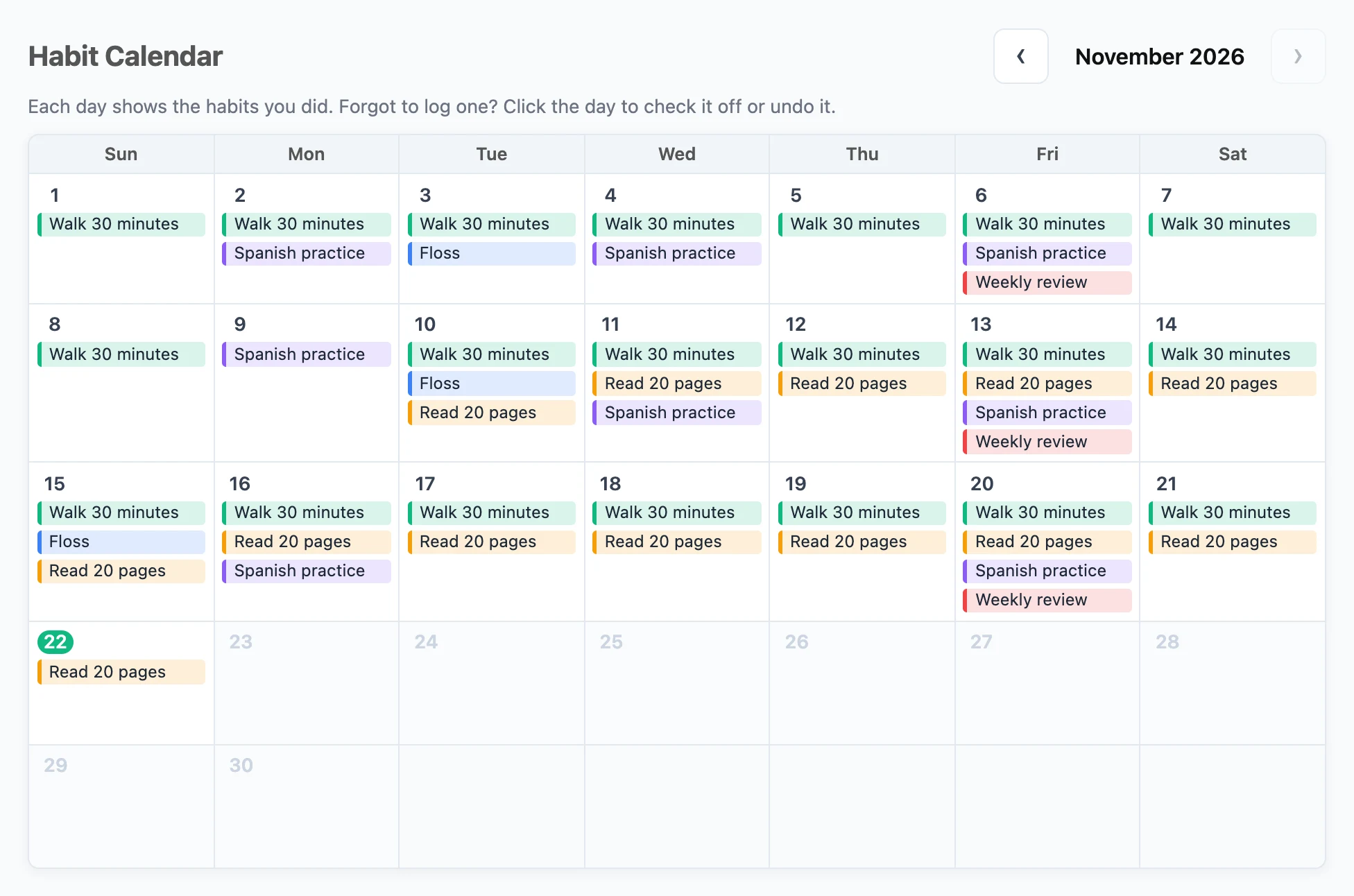
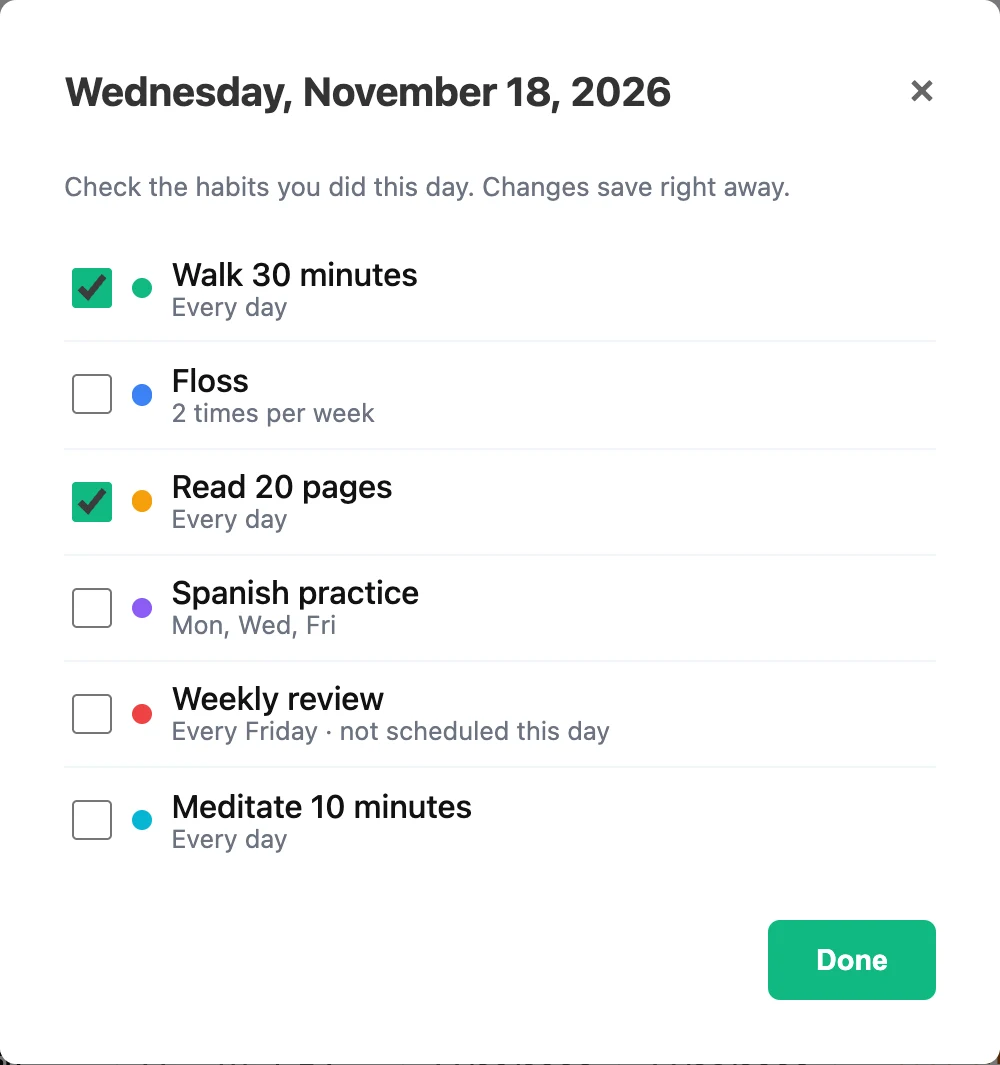
Did a habit yesterday but forgot to click Done today? Click that day on the calendar. A small box opens with all your habits. Check the ones you did that day, or uncheck one to undo it. Changes save right away, and Last, Due and Status update with them.
Habit ideas to start with
If you're not sure where to begin, here are some common habits and a schedule that fits each one:
| Habit | How often |
|---|---|
| Walk 30 minutes | Every day |
| Read 20 pages | Every day |
| Floss | Every day, or 3 times per week to start |
| Gym or a workout | Monday, Wednesday and Friday |
| Practice a language | 3 times per week |
| Weekly review of your tasks | Every Friday |
| Call a family member | Every week |
| Change your sheets | Every 2 weeks |
| Check your budget | Every month |
| Dentist checkup | Every 6 months |
Start with one or two habits, not ten. When those feel easy, add the next one. It's better to keep two habits for a month than to drop eight after a week.
Use it on your phone
Most habits happen away from your desk, so your phone is the handiest place to check them off. On a small screen, the calendar shows each habit as a colored dot, with a key under it. You can see your whole month at a glance.
You can also add IAM Rate to your home screen and open it like an app. The features article shows how.
Free, with no account
The Habit Tracker is free in guest mode. There's no sign-up, and you can add as many habits as you like. They are saved in your browser. If you clear your browser data, they're removed, so don't use a private window for it.
An account costs $18 a year, which is $1.50 a month. With an account, your habits are saved online, and you see the same habits on your phone, laptop and tablet. Habits you added as a guest move into your account when you sign in, with every day you checked off.
Your habits, tasks, plants and outfits in one place
The Habit Tracker lives in the same app as your to-do list, your time log, the Plant Care Tracker and the Style Tracker, a fashion diary for your outfits, so you don't need one more app for it.
Habits and to-do lists work well together. Routines go in the Habit Tracker, so your daily list stays short and holds only real tasks. For tips on that list, read how to build a daily to-do list. If you keep putting a habit off, these seven techniques can help you start. To see everything else the app does, read the full list of IAM Rate features.
Questions and answers
How do I track my time on daily tasks?
When you finish a task, type what you did, add the hours and minutes it took and pick a category. Daily Task Tracker adds it all up in charts for today, this week and this month, so you can see where your time goes.
What can I track in the app?
Four things, each in its own tab. The Daily Task Tracker logs your tasks and time. The Habit Tracker helps you build daily habits. The Plant Care Tracker keeps a watering schedule for your plants. The Style Tracker is a fashion diary for the outfits you wear. Everything is free in guest mode and works on your phone.
How do I make a weekly report for my manager?
Add a short note to your tasks as you go. At the end of the week, copy your plain text log or download the CSV and sort it by category. Your hours and notes are already in one place.
Is the app free?
Yes. Guest mode is free and has every feature in every tab, with your tasks, habits, plants and outfits saved in this browser. An account costs $18 a year, which is $1.50 a month, and keeps all of it on all your devices. You can cancel anytime.
Will I lose what I added as a guest if I sign up?
No. When you sign in, the tasks, habits, plants and outfits you added as a guest in that browser move into your account. Until then they are saved only in that browser, so download a CSV of your tasks now and then.
Can I use it on my phone?
Yes. It works in the browser on any phone, tablet or computer. You can also add it to your home screen and open it like an app.
Can I track my daily habits?
Yes. The Habit Tracker is a tab in the same app. Add a habit and choose how often: every day, every week, every month, every few days, weeks or months, on certain days of the week, or a number of times per week. Click Done today each time you do it. The app shows when each habit is due next, turns it red when it is late, and sums up how you are doing over the past week and month. A habit calendar shows every day you did it.
Can I keep a watering schedule for my plants?
Yes. The Plant Care Tracker is a tab in the same app. Add each plant with the last date and how often it needs watering, fertilizer, deep watering and repotting. The app shows the next date for each one. A date turns green on the day it is due and red when it is late.
Can I keep track of the outfits I wear?
Yes. The Style Tracker is a free fashion diary in the same app. Add each outfit with the event or place and the date, and what you wore, from tops, skirts and shoes to jewelry and handbags. Log a dress, jumpsuit or costume under General. The newest outfits are at the top, so you can check what you wore last time and try something new.
Is Daily Task Tracker good for people with ADHD?
Yes. It helps you work on one task at a time, keep a simple to-do list for the day and see your progress as you go. The daily goal cards make progress easy to see, so it is easier to stay focused and finish tasks.
How can I stop procrastinating and complete my tasks?
Add your tasks to a daily to-do list, pick the most important one and work on it until it is done. Logging the time you spend shows your progress, which helps you build momentum and avoid procrastination.
Start building your habits today
The Habit Tracker is free. You don't need an account to start. Your habits save right in your browser.
Go to App