Plant Care Tracker: A Free Watering Schedule for Your Houseplants
It's easy to forget when you last watered a plant. Was it last Sunday, or the Sunday before? With one plant you can guess. With six plants, each on its own timing, guessing stops working. Some get too much water and some get none.
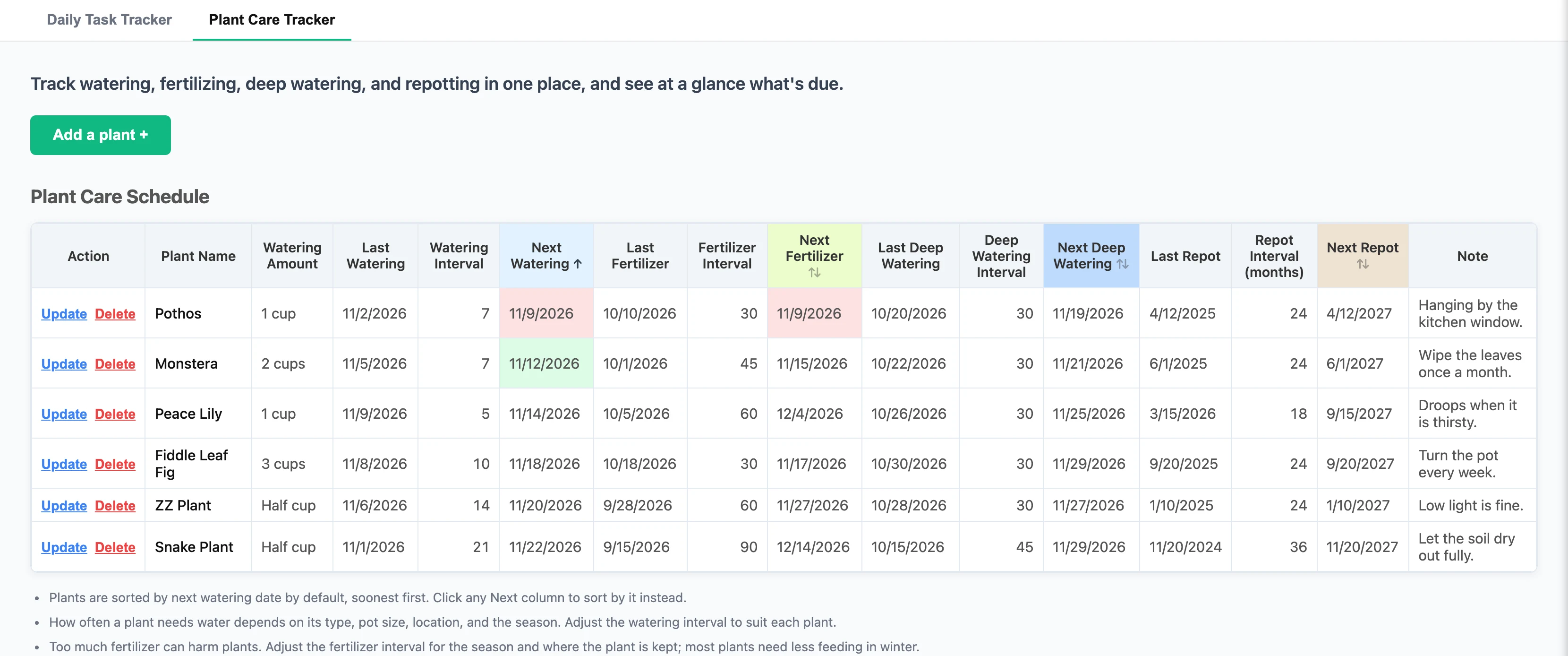
The Plant Care Tracker is a new tab in IAM Rate, right next to the Daily Task Tracker. You enter each plant once and say how often it needs care. The tracker works out the next date for watering, fertilizer, deep watering and repotting. Then it shows you what's due today.
Why a watering schedule helps
Too much water hurts a houseplant as much as too little. Most of the time the cause is the same. We water when we happen to remember, so one plant gets water three times in a week and another waits a month.
A schedule takes the remembering off you. You don't have to keep dates in your head for every pot in the house. You look at one table, and it tells you which plants are due.
You also learn from it. After a few weeks you can see that the fern by the window dries out faster than the one in the hallway, and you can change its timing.
Add a plant in a minute
Open the app and click the Plant Care Tracker tab. The first time, you'll see a sample ZZ Plant, so the table isn't empty. Update it or delete it when you add your own plants.
- Click Add a plant +.
- Type the plant name. This is the only box you have to fill in.
- Add the watering amount if you like, such as "Half cup".
- For each kind of care, pick the last date you did it and how often the plant needs it.
- Add a note of up to 500 characters, then click Save.
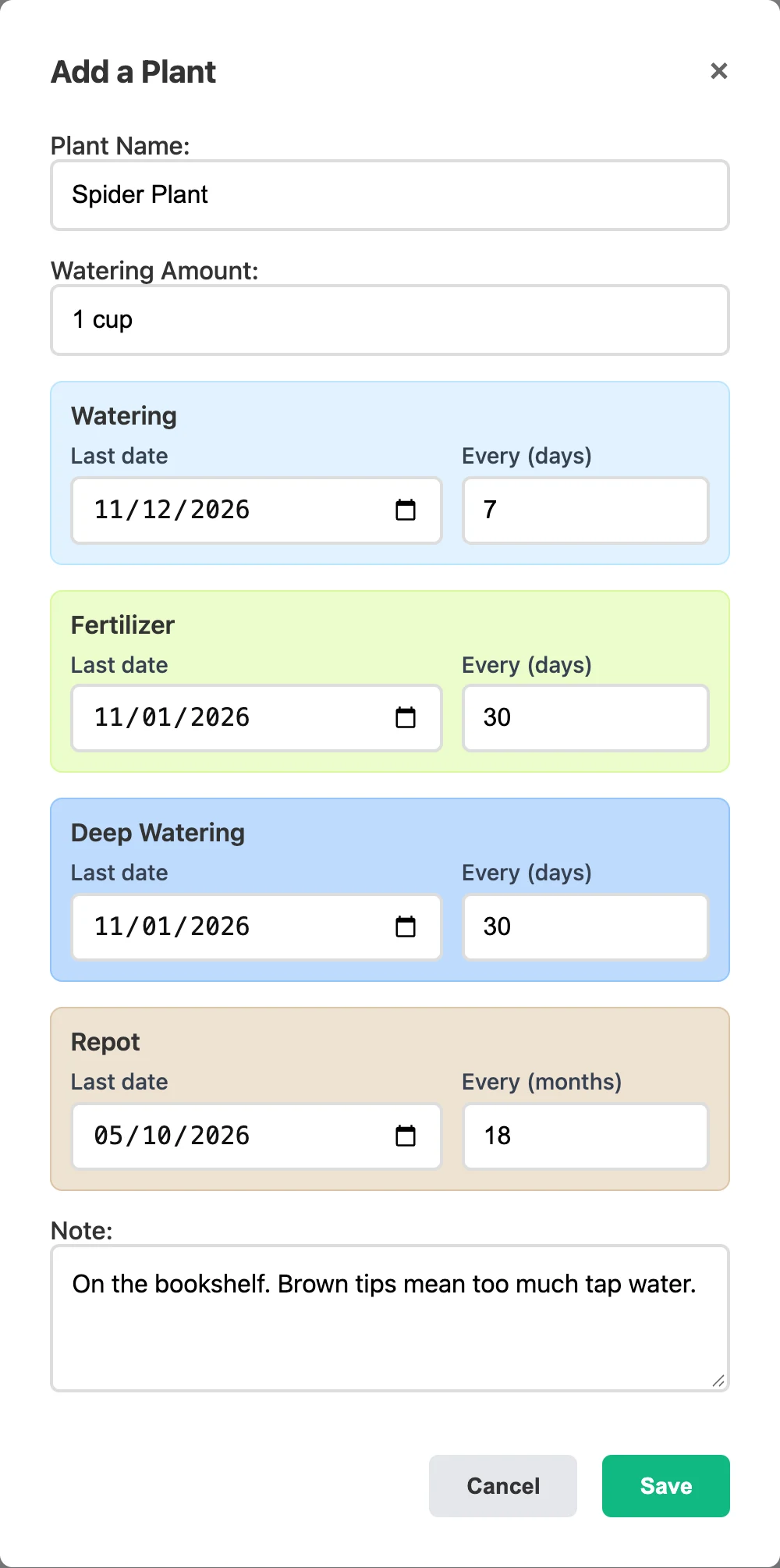
You can leave any kind of care empty. If you never fertilize a plant, skip those two boxes, and that plant won't have a next fertilizer date.
The note is a good place for things you'd forget, like where the plant sits, how much light it likes or what its yellow leaves meant last time.
Four kinds of care on one schedule
| Care | What it is | Counted in |
|---|---|---|
| Watering | The regular drink your plant gets | Days |
| Fertilizer | Plant food, added to the water or the soil | Days |
| Deep watering | A slow, full soak until water runs out of the bottom of the pot | Days |
| Repot | Fresh soil, or a bigger pot when the roots run out of room | Months |
Watering is the job everyone thinks of. Fertilizer and repotting are easier to forget, because they come up so rarely. It's hard to remember if you fed a plant six weeks ago or ten. With the dates in the table, you don't have to.
See what's due at a glance
The tracker adds the interval to the last date and shows the next date. Say you watered your Monstera on 11/5 and it needs water every 7 days. The Next Watering column shows 11/12.
Color tells you the rest:
- Green means the care is due today.
- Red means the date has passed and the plant is still waiting.
- No color means you can leave the plant alone.
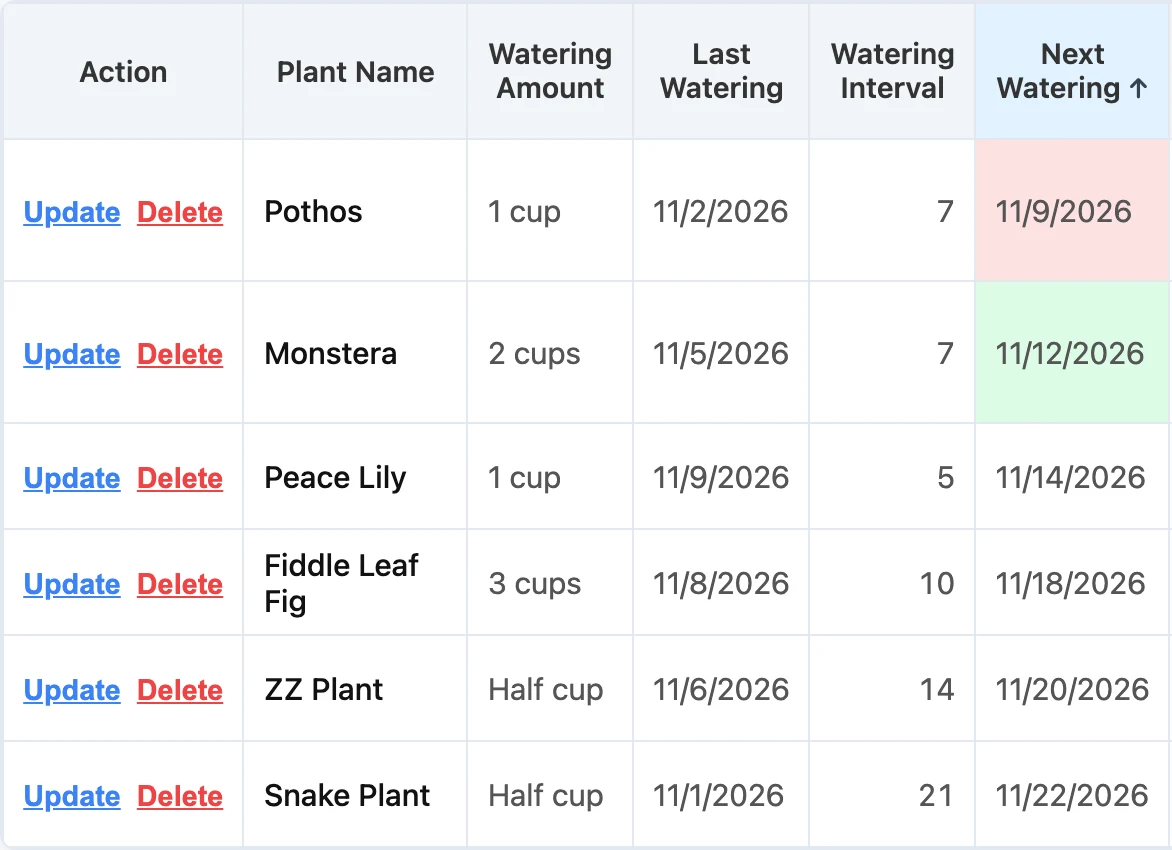
Plants are sorted by next watering date, with the soonest first. The plants that need water are always at the top of the table. Click Next Fertilizer, Next Deep Watering or Next Repot to sort by that date. Click the same header again to flip the order.
After you water, update the date
When you've watered a plant, click Update next to it and set the last watering date to today. Click Save. The next date moves forward by itself, the color goes away and the plant moves down the list.
It works the same way for fertilizer, deep watering and repotting. Change the last date, and the next one follows.
Tip: Take your phone with you when you water. Update each plant right after you finish it, while you're still standing next to it.
One thing to know: the tracker doesn't send notifications. You open the tab and look for red and green. It helps to tie this to something you already do each day, like making your morning coffee.
How often should you water?
There's no single right number. It depends on the kind of plant, the size of the pot, where it sits and the time of year. If you're not sure where to begin, these are common starting points for indoor plants:
| Plant | Water about every |
|---|---|
| Peace lily, ferns | 5 to 7 days |
| Pothos, monstera, spider plant | 7 to 10 days |
| Fiddle leaf fig, rubber plant | 7 to 14 days |
| Snake plant, ZZ plant | 14 to 21 days |
| Cactus and other succulents | 14 to 28 days |
Treat these numbers as a first guess. Before you water, push a finger about an inch into the soil. If it's still wet, wait a few days and make the interval longer. If the plant droops before its date comes up, make the interval shorter. After a month or two, the numbers will fit your home.
Seasons matter too. Most houseplants grow slowly in winter, so they need less water and less fertilizer. Too much fertilizer can harm a plant. When the season changes, change the intervals.
Use it on your phone
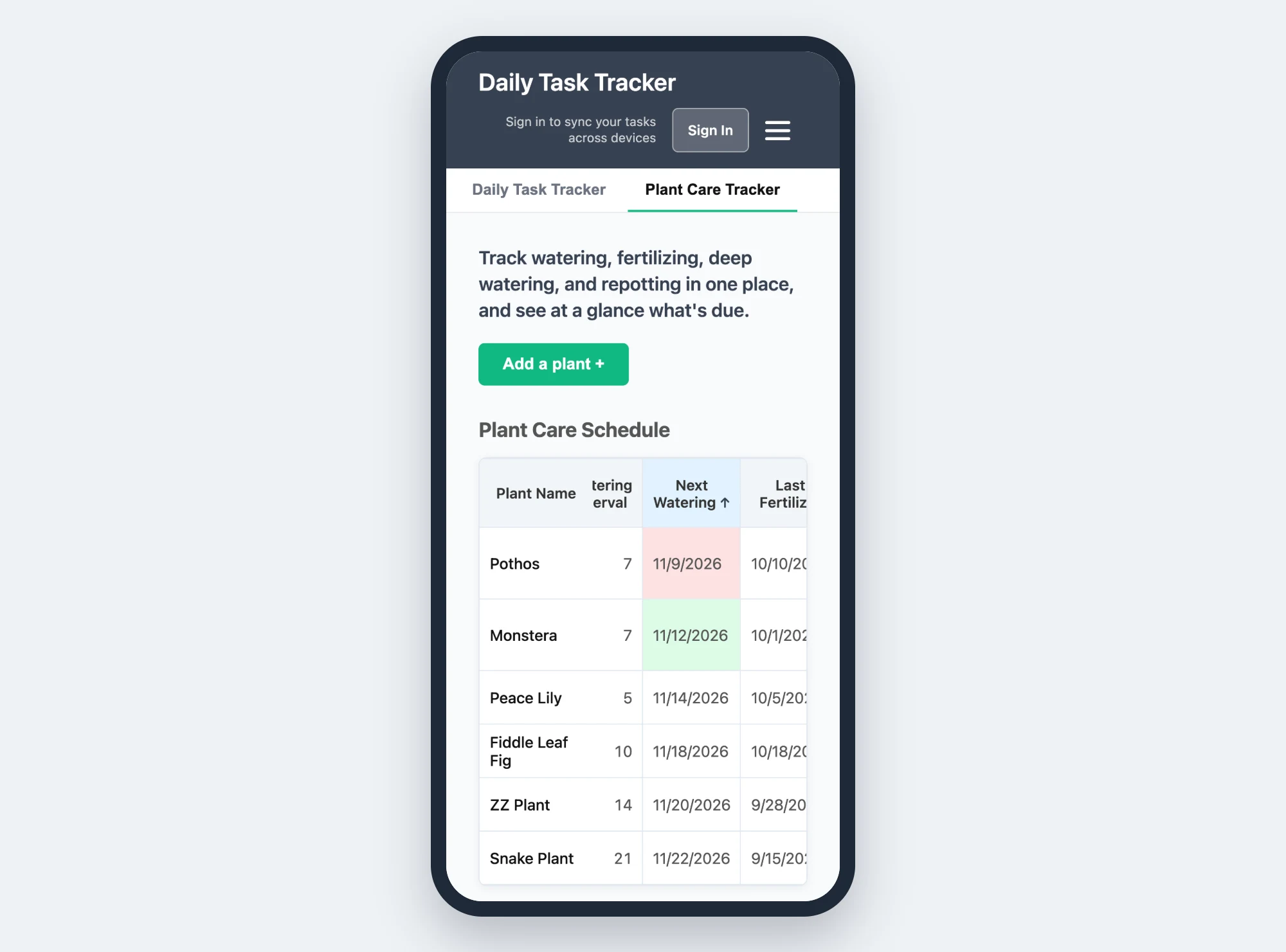
Your plants are all over the house, so your phone is the handiest place to keep the schedule. On a small screen, the plant name stays in place while you swipe across the dates. You always know which plant a date belongs to.
You can also add IAM Rate to your home screen and open it like an app. The features article shows how.
Free, with no account
The Plant Care Tracker is free in guest mode. There's no sign-up, and you can add all your plants. They are saved in your browser. If you clear your browser data, they're removed, so don't use a private window for it.
An account costs $18 a year, which is $1.50 a month. With an account, your plants are saved online, and you see the same schedule on your phone, laptop and tablet. Plants you added as a guest move into your account when you sign in.
Your plants and your tasks in one place
Plant care is one more thing to keep track of. The tracker lives in the same app as your to-do list and your time log, so you don't need one more app for it.
If you plan your day with a list, add a line like "Check the plant tracker" on the days you usually water. For tips on a list that works, read how to build a daily to-do list. To see everything else the app does, read the full list of IAM Rate features.
Start your plant care schedule today
The Plant Care Tracker is free. You don't need an account to start. Your plants save right in your browser.
Go to App